
Here are the details about how I went from my pattern pieces to a digital, printable pattern. Many stores that offer printing services will also offer large format scanning of documents up to 36″. It’s not always easy to find on their webpages, but here are a couple of links for people living in the US:
- Staples: https://www.staples.com/sbd/cre/marketing/copy-and-print/blueprints/index.html
- FedEx Kinkos: https://www.fedex.com/en-us/printing/posters/architectural-prints.html
Many universities and libraries will also offer large format scanning. I know that both the University of Utah and Brigham Young University offer to scan documents up to 36″. Since it was the closest and open on Sunday, I went to Staples to get my documents scanned. I was able to scan two documents (36″ x 48″) and they only charged me $1.00 / page!!
The only large format paper I had around the house was my tracing paper. I used a nice thick permanent marker for my lines so I could easily see them on the scanned document. In the future, I’ll purchase plotter paper and create my patterns on that. It’ll be easier to scan and if I ever want to print directly from the scanned document I can.
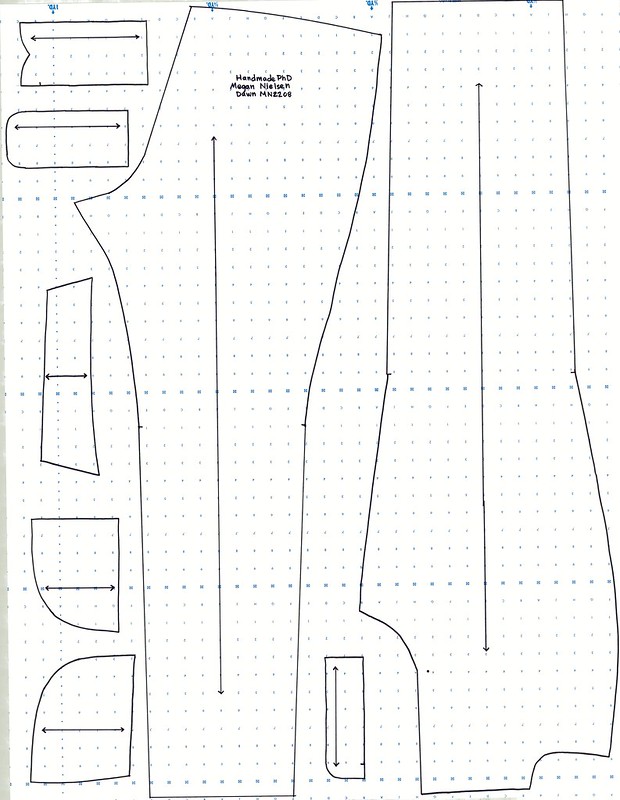
Because I would never want to directly print from my scanned document with all the alphanumeric nonsense, I went further and used Adobe Illustrator to trace my pattern pieces. If you know how to work with Adobe Illustrator then the process isn’t that difficult. Just trace and clean things up a bit.
There you have it. Now if only I had a place big enough to hold a wide format printer. I could digitize all my patterns and get rid of ALL paper in my sewing room. That would seriously spark joy!

IF YOU FOUND THIS POST HELPFUL, CONSIDER SUPPORTING MY WORK BY SIGNING UP FOR A PAID SUBSCRIPTION.
POSTS OLDER THAN 3 MONTHS ARE NOW FOR SUBSCRIBERS ONLY — YOUR SUPPORT KEEPS THIS SPACE GOING.
INTERESTED IN SUBSCRIBING TO RECEIVE NEW POSTS IN YOUR INBOX?

Leave a comment